Give Clients 24/7 Answers Without Interrupting Your Day
Clients call with the same questions attorneys already answered — or worse, they call at 10 PM because they're anxious about a hearing they don't understand. These interruptions break your focus and eat into billable time. DocketBreeze's Ask About Your Case feature puts your clients in direct conversation with their own case documents, so they get accurate answers the moment they need them — without ever dialing your number.
How It Works
Ask About Your Case is a built-in AI chat panel, available on every case in DocketBreeze. Here's how it works for your clients:
Step 1: Open the Case Overview
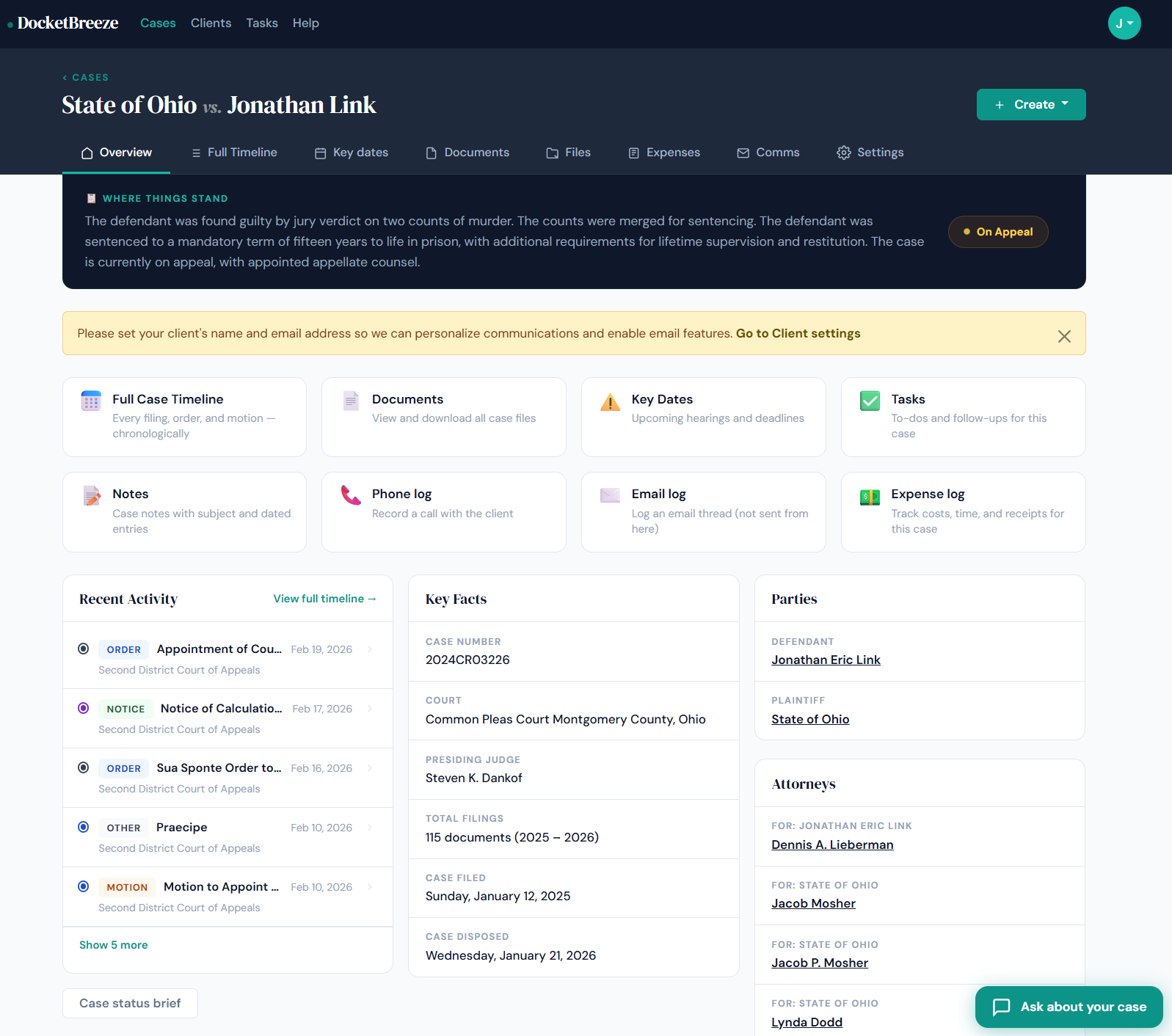
From the My Cases dashboard, your client clicks into any active matter. The Overview page shows a plain-English "Where Things Stand" summary at the top, plus quick links to all core features — including Ask About Your Case.
Step 2: Click "Ask About Your Case"
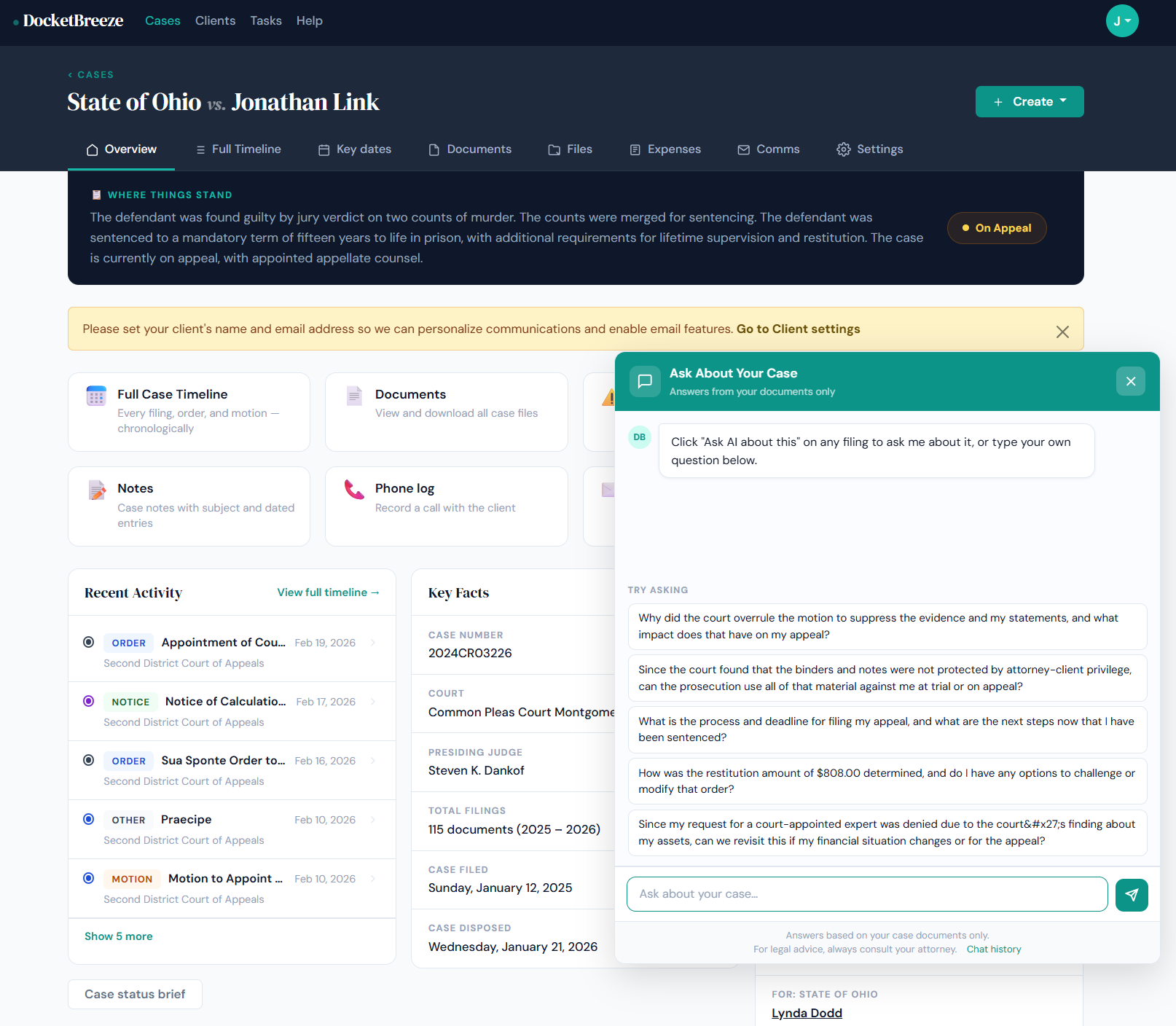
Your client clicks the "Ask About Your Case" tile — or the floating chat button in the bottom-right corner — to open the AI panel. The panel opens instantly, right inside the client portal, with pre-loaded suggested questions pulled from their specific case documents.
Step 3: Ask a Question — or Choose a Suggested One
Your client can tap one of the pre-suggested questions — generated specifically from their case documents — or type any free-form question in the text field. The AI responds only from documents in their case file, so answers are always grounded in their actual legal matter. A subtle disclaimer at the bottom reminds them to consult their attorney for legal advice, keeping your professional role front and center.
Why It Matters
Attorneys lose an average of several hours per week to repetitive client check-in calls. Ask About Your Case reclaims that time by giving clients immediate, document-backed answers — on their own schedule, at any hour. It also builds client confidence: a client who understands what's happening in their case is a more engaged, less anxious client — and that relationship pays dividends long after the case closes.
Ready to let your clients get answers without the phone tag? Sign up at docketbreeze.ai and see Ask About Your Case in action.
Check out more features
-
Case Files & Client Upload LinkDocketBreeze's Files feature gives every matter a dedicated working file room: organized, folder-based, uploadable by anyone you authorize, and always separate from the official docket library. And when you need a client to send you materials, a single secure link is all it takes.
-
Client Case PortalDocketBreeze's Client Portal lets you share a read-focused view of any matter directly with your client, while Case Sharing lets you add co-counsel with full collaboration access. You decide who sees what, and you can revoke access at any time.
-
Full Case TimelineDocketBreeze's Full Case Timeline gives you and your clients a single, chronological record of every filing, hearing, deadline, and event from the first docket entry to the most recent.
-
The DocketDocketBreeze's Documents view is your structured docket library: every filing, organized by type and party, analyzed by proprietary AI with search and filters so the document you need is always one click away.