Full Case Timeline
Keeping track of what happened in a case — and in what order — shouldn't require hunting through multiple tabs, physical files, or court websites. Without a unified view, it's easy to miss the connection between a motion filed in June and the order that followed in August. DocketBreeze's Full Case Timeline gives you and your clients a single, chronological record of every filing, hearing, deadline, and event from the first docket entry to the most recent.
How It Works
Step 1: Open the Timeline tab
From any case workspace, click the Full Timeline tab. Entries appear in reverse-chronological order — most recent at the top — grouped by year. Every entry is color-coded and labeled by type: Orders, Motions, Notices, Hearings, Filing Deadlines, Phone Conferences, and more. The timeline blends actual court docket entries with calendar events you've added, giving you the complete picture in one place.
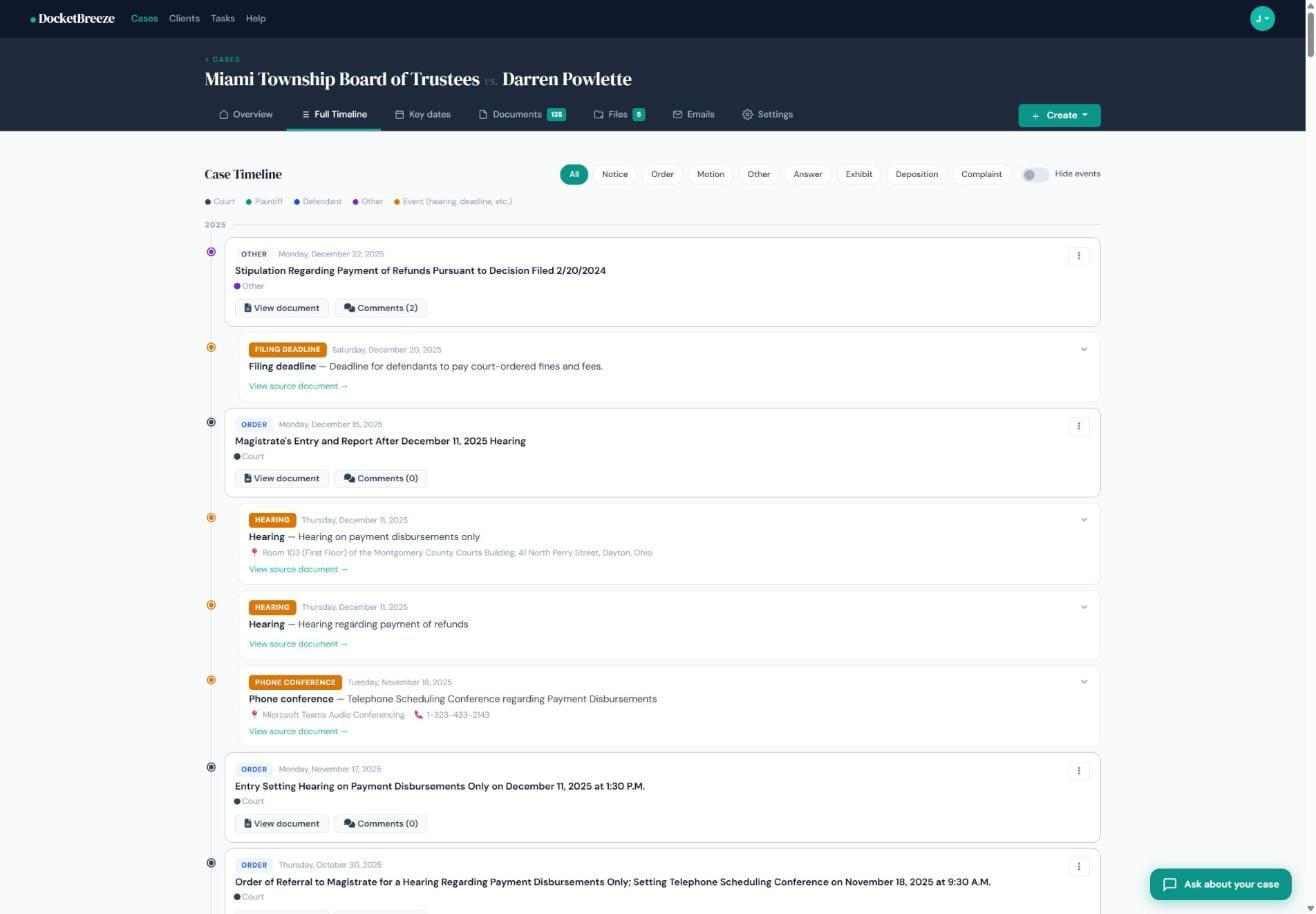
Step 2: Filter by entry type
Use the filter chips at the top — Notice, Order, Motion, Exhibit, Deposition, Complaint — to narrow the timeline to just what you need. Heading into a hearing on a motion to dissolve an injunction? Filter to Motions and Orders to see only the relevant chain. The color legend also lets you see at a glance which party filed each entry: Court, Plaintiff, Defendant, or Other.
Step 3: Open a filing or add a comment
Click "View document" on any filing to open the original court PDF in a built-in viewer. Click "Comments" to open a threaded discussion on that specific entry — so your team can annotate strategy, flag issues, or note page references without leaving the record. Comments stay attached to the document permanently.
Why It Matters
The timeline is your case's narrative — from the first complaint to enforcement. Whether you're preparing for a hearing, catching up a new co-counsel, or explaining to a client why a certain order matters, having every event in one scrollable, filterable view saves hours of reconstruction work. For high-volume matters like the Miami Township case with 135 docket entries across 6 years, the timeline turns chaos into clarity.
Ready to see your cases come to life in a timeline? Sign up at docketbreeze.ai and bring every filing into focus.
Check out more features
-
Case Files & Client Upload LinkDocketBreeze's Files feature gives every matter a dedicated working file room: organized, folder-based, uploadable by anyone you authorize, and always separate from the official docket library. And when you need a client to send you materials, a single secure link is all it takes.
-
Client Case PortalDocketBreeze's Client Portal lets you share a read-focused view of any matter directly with your client, while Case Sharing lets you add co-counsel with full collaboration access. You decide who sees what, and you can revoke access at any time.
-
Give Clients 24/7 Answers Without Interrupting Your DayClients call break your focus and eat into billable time. DocketBreeze's Ask About Your Case feature puts your clients in direct conversation with their own case documents, so they get accurate answers the moment they need them - without ever dialing your number.
-
The DocketDocketBreeze's Documents view is your structured docket library: every filing, organized by type and party, analyzed by proprietary AI with search and filters so the document you need is always one click away.