The Docket
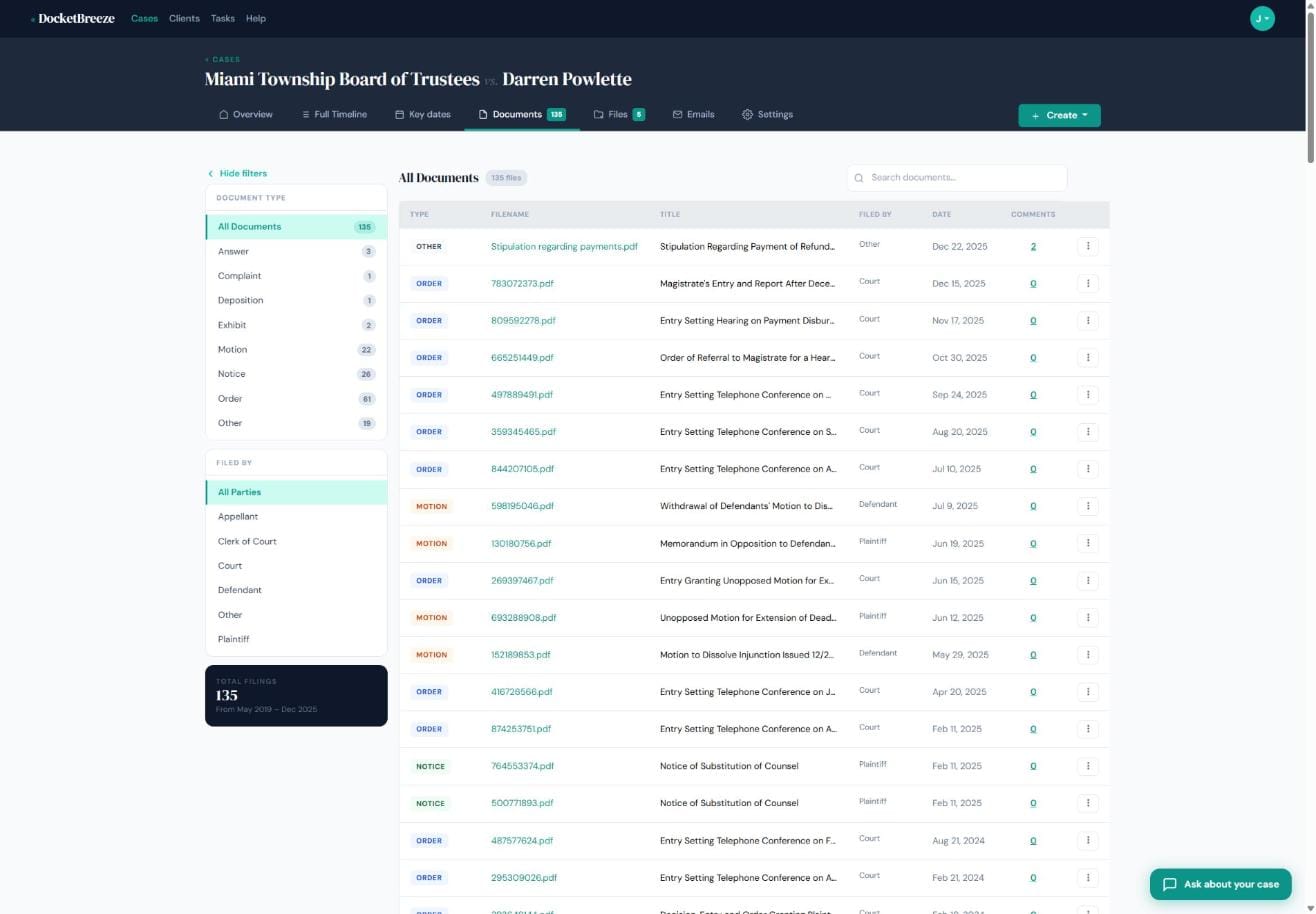
Court dockets accumulate fast. By the time a civil enforcement matter reaches year six, you can be staring down 135 filings from multiple parties — and finding the one motion you need shouldn't require scrolling through everything. DocketBreeze's Documents view is your structured docket library: every filing, organized by type and party, with search and filters so the document you need is always one click away.
How It Works
Step 1: Open the Documents tab
From any case workspace, click the Documents tab. You'll see a complete list of all docket-linked documents — sorted by date, newest first — with each entry showing its type badge, filename, title, filing party, date, and comment count. The left sidebar shows your total filing count and a breakdown by document type.
Step 2: Filter by document type or filing party
Click any document type in the left panel — Answer, Complaint, Deposition, Exhibit, Motion, Notice, Order, or Other — to instantly narrow the list. Then filter further by filing party: Court, Plaintiff, Defendant, Appellant, Clerk of Court, or Other. Need all 22 motions filed by the Defendant? Two clicks. The filtered count updates live so you know exactly how many documents match.
Step 3: Search and open
Use the search bar to find documents by keyword. Click any filename to open the document in DocketBreeze's built-in viewer. The three-dot menu on each row gives you options to view, download, or add a comment — all without leaving the page.
Why It Matters
When you're juggling a case with hundreds of filings across multiple parties, finding a specific document shouldn't require a court website login or a local file search. DocketBreeze's Documents view keeps your entire docket at your fingertips — filtered, searchable, and accessible from anywhere. Less time hunting, more time arguing.
Ready to bring your docket library into one place? Sign up at docketbreeze.ai today.
Check out more features
-
Case Files & Client Upload LinkDocketBreeze's Files feature gives every matter a dedicated working file room: organized, folder-based, uploadable by anyone you authorize, and always separate from the official docket library. And when you need a client to send you materials, a single secure link is all it takes.
-
Client Case PortalDocketBreeze's Client Portal lets you share a read-focused view of any matter directly with your client, while Case Sharing lets you add co-counsel with full collaboration access. You decide who sees what, and you can revoke access at any time.
-
Full Case TimelineDocketBreeze's Full Case Timeline gives you and your clients a single, chronological record of every filing, hearing, deadline, and event from the first docket entry to the most recent.
-
Give Clients 24/7 Answers Without Interrupting Your DayClients call break your focus and eat into billable time. DocketBreeze's Ask About Your Case feature puts your clients in direct conversation with their own case documents, so they get accurate answers the moment they need them - without ever dialing your number.